AI at your
fingertips.
Select text anywhere in Windows → press Ctrl+Shift+Z → get AI results instantly. No browser, no copy-paste, no sign-up.
⚡ 32.9 MB 🔒 No cloud server ♥ Free + Donation
6 Powerful AI Actions
One Click Away
Works in any app — Chrome, VS Code, Notepad, WhatsApp, Word, and more.
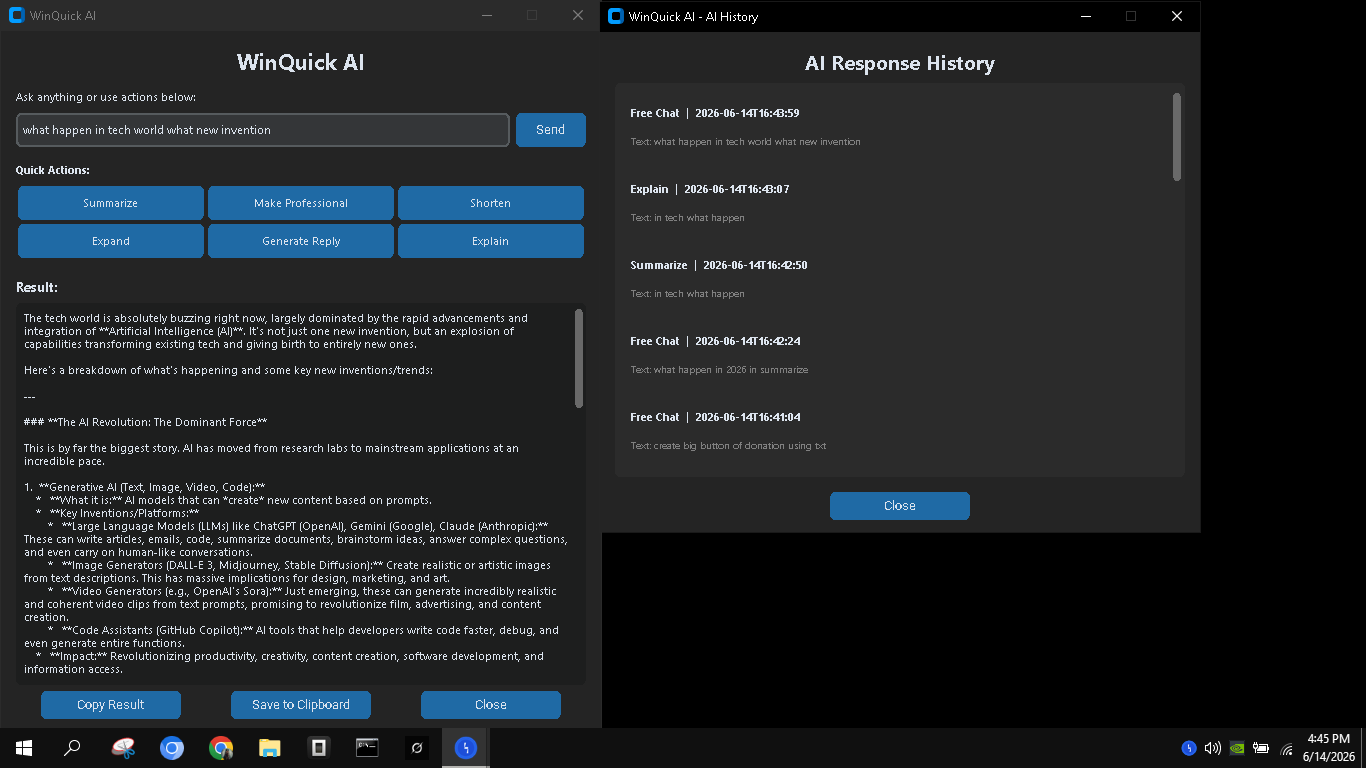
Summarize
Condense long articles, docs, or emails into 3-5 crisp bullet points.
Make Professional
Rewrite casual or rough text into a polished, professional tone instantly.
Shorten
Get straight to the point. Shrink your text while keeping the core meaning.
Expand
Add depth, examples, and detail to short notes or ideas.
Generate Reply
Turn a message into a polite, contextual response — perfect for emails & chats.
Explain
Break down complex concepts into simple, easy-to-understand language.
Three Simple Steps

Select Text
Highlight any text in any Windows app — browser, editor, chat, document.
Press Ctrl+Shift+Z
Your global hotkey. Works everywhere, no configuration needed.
Get AI Result
Choose an action or just chat. Copy the result and paste anywhere.
See It In Action
Download WinQuick AI
Free for everyone. No sign-up, no account, no hidden fees.
WinQuickAI.exe
♥ Keep It Free
WinQuick AI is free for everyone. If it helps you, consider supporting the project.
Your donation supports continued development, new features, and keeping WinQuick AI free for everyone.
No feature is paywalled — ever.
PayPal • UPI • Card • Crypto — whatever works for you